# The First Open Weight Model for Deterministic Work: Interfaze 1 Lite
URL: https://interfaze.ai/blog/the-first-open-weight-model-for-deterministic-work-interfaze-1-lite
Almost every model you can call today was trained to write for a person. **interfaze-1-lite** is built to be read by your code: open weights, one GPU, and a confidence score on everything it reads.

 ## Models for people, models for machines
A chat model's answer is judged by the person reading it. If it's a little off, the reader notices, rephrases, and moves on.
In a pipeline, the reader is an `if` statement. It can't tell a confident answer from a lucky guess, so every mistake flows straight into your database.
That changes what a good output looks like:
| | Built for a person | Built for a program |
| --------------- | ---------------------------- | ------------------------------------------ |
| **Output** | Prose that reads well | Typed fields that match a schema |
| **Labels** | Any word that sounds right | Only values from the set you defined |
| **Location** | "Near the top of page 2" | A bounding box, a page number, a timestamp |
| **Confidence** | Implied by tone | A number on every line, word and field |
| **Consistency** | Nice to vary from run to run | Same input, same output |
| **Mistakes** | Caught by the reader | Caught by a threshold, or not at all |
The confidence score is the one that matters most. A model that is right 95% of the time can't automate a task unless it also tells you which answers are in the other 5%.
With a score, the rule is simple: act on anything above your threshold and send the rest to a person. Without one, a person has to check everything, and nothing is automated.
## Introducing interfaze-1-lite
**interfaze-1-lite** is an open-weight, any-to-text model for deterministic work. It takes text, images, audio and files, including PDFs and Word documents, and returns text or JSON that matches your schema.
It's built for tasks where there's one right answer:
- [OCR](https://interfaze.ai/docs/vision/ocr) with a box and confidence for every line and word
- [Speech-to-text](https://interfaze.ai/docs/audio/speech-to-text) with [speaker diarization](https://interfaze.ai/docs/audio/stt-speaker-diarization)
- Classification and [structured extraction](https://interfaze.ai/docs/structured-output) into your schema
- [Object detection](https://interfaze.ai/docs/vision/object-detection) and [GUI detection](https://interfaze.ai/docs/vision/gui-detection)
- [Translation](https://interfaze.ai/docs/translation), [forecasting](https://interfaze.ai/docs/compute/time-series-forecasting) and [guardrails](https://interfaze.ai/docs/guardrails)
The weights are Apache 2.0 and the whole model runs on a single 80 GB GPU. Through the API it's \$0.85 per million input tokens and \$1.50 per million output tokens.
| | interfaze-1-lite |
| ----------------- | -------------------------- |
| Input price | \$0.85 / MTok |
| Output price | \$1.50 / MTok |
| Context window | 128k tokens |
| Max output tokens | 32k tokens |
| Input | Text, images, audio, files |
| Output | Text, JSON |
| Reasoning | Available |
| PDF pages | Up to 50 per request |
| Open weights | Yes, runs on one 80 GB GPU |
| License | Apache 2.0 |
## The architecture
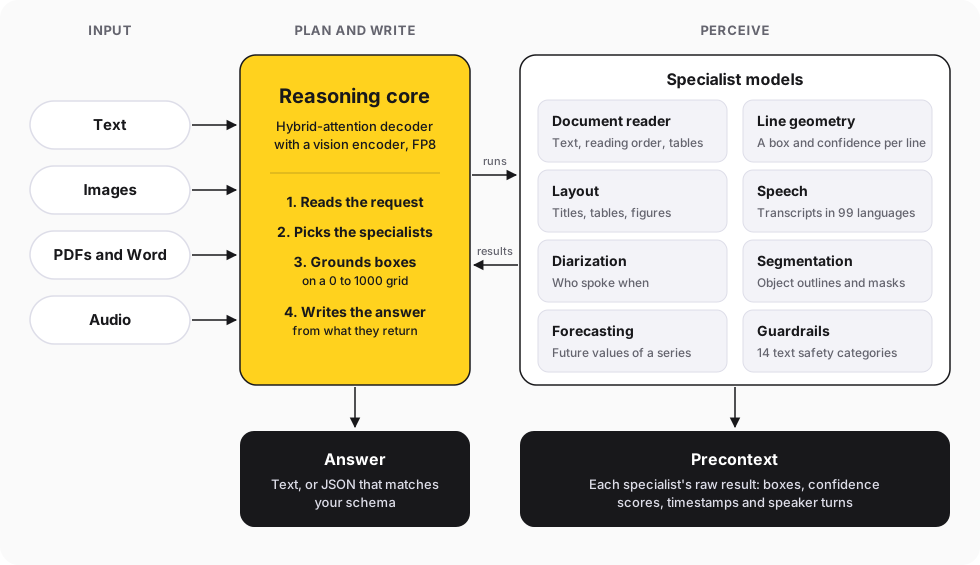
Lite isn't one network. It's a **reasoning core** plus **specialist models**, each built for one kind of perception.
The core reads the request, decides which specialists to run, and writes the answer from what they return. The specialists do the reading, listening and locating that a general model is weakest at.
### Why split it up
A single vision-language model can read a page well. But it reads the way a person does: it gives you the words, not where they are or how sure it was.
Specialists produce that metadata as part of how they work. A text detector scores every line it finds, and a speech recognizer timestamps every word.
| Approach | Reads the content | Exact positions | Confidence per line | Handles nuance |
| ---------------------------- | ----------------- | --------------- | ------------------- | -------------- |
| General VLM alone | Yes | Approximate | No | Yes |
| Specialist models alone | Yes | Yes | Yes | No |
| **Lite: core + specialists** | **Yes** | **Yes** | **Yes** | **Yes** |
The core keeps what makes an LLM useful: it understands the request, follows your schema and reasons about what it read. The specialists keep what makes classic models useful: precise output with a score attached.
### How the parts combine
**OCR stitches two views of one page.** The document reader supplies the text in reading order, and the line detector supplies the geometry and confidence.
Each detected line takes the reader's words for it. The box is exact, the text is complete, and the confidence comes with it.
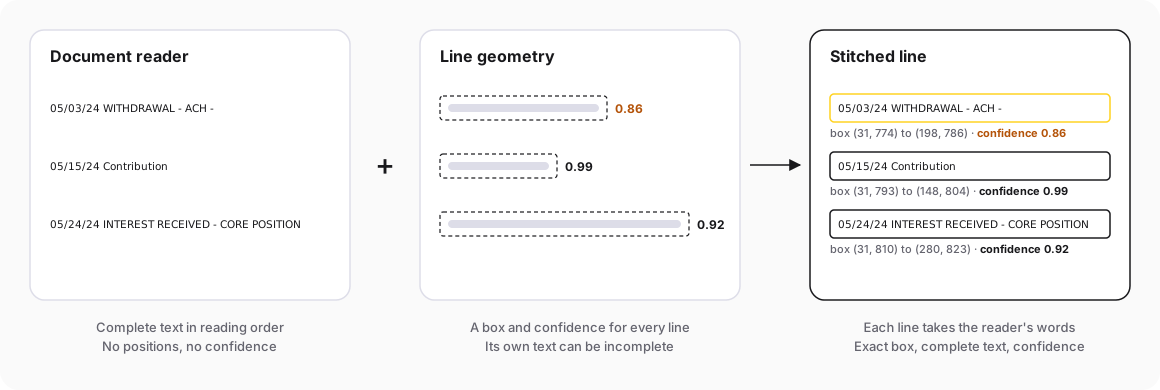
These are real lines and scores from the bank statement in the example below.
The other parts combine the same way:
- **Speakers are attributed per word,** by the largest overlap with each speaker's turns, then grouped into chunks.
- **Detection and GUI grounding run on the reasoning core,** which returns boxes on a 0 to 1000 grid. Outlines come from the segmentation model.
- **A [run task](https://interfaze.ai/docs/run-tasks) skips planning.** Naming one capability runs that specialist directly and returns its raw result.
Everything the specialists produce comes back in [precontext](https://interfaze.ai/docs/precontext), next to the answer. Your code gets the clean JSON and the evidence behind it in the same response.
## Benchmarks
Lite is on the [leaderboard](https://interfaze.ai/leaderboards) next to Gemini-3.7-Flash, Claude-Sonnet-5, GPT-5.4-Mini and Grok-4.3. Bold marks where Lite beats all four.
| Benchmark | Task | interfaze-1-lite | interfaze-1 | Best of the other four |
| --------------------------------------------------------------------- | ---------------------- | ---------------- | ----------- | ----------------------- |
| [MMMU-Pro](https://interfaze.ai/leaderboards/mmmu-pro) | Multimodal reasoning | **73.2%** | 71.1% | Grok-4.3, 68.7% |
| [RefCOCO](https://interfaze.ai/leaderboards/refcoco) | Visual grounding | **83.8%** | 82.1% | Gemini-3.7-Flash, 80.9% |
| [SOB value accuracy](https://interfaze.ai/leaderboards/structured-output-benchmark) | Structured output | **81.5%** | 80.5% | Gemini-3.7-Flash, 80.2% |
| [olmOCR](https://interfaze.ai/leaderboards/olmocr) | Document OCR | **83.8%** | 85.7% | Claude-Sonnet-5, 83.5% |
| [VoxPopuli WER](https://interfaze.ai/leaderboards/voxpopuli-cleaned-aa) (lower is better) | Speech recognition | **3.0%** | 2.4% | Gemini-3.7-Flash, 4.0% |
| [Spider 2.0-Lite](https://interfaze.ai/leaderboards/spider-2-lite) | Text-to-SQL | 48.9% | 52.9% | Claude-Sonnet-5, 50.6% |
| [GPQA Diamond](https://interfaze.ai/leaderboards/gpqa-diamond) | PhD-level science | 85.9% | 92.4% | Gemini-3.7-Flash, 91.4% |
| [OCRBench V2](https://interfaze.ai/leaderboards/ocrbench-v2) | Text in images | 60.9% | 70.7% | Gemini-3.7-Flash, 63.9% |
| [MMMLU](https://interfaze.ai/leaderboards/mmmlu) | Multilingual knowledge | 87.8% | 90.9% | Grok-4.3, 89.7% |
Lite leads on multimodal reasoning, visual grounding, structured output, document OCR and speech. It even edges out our flagship on MMMU-Pro, RefCOCO and SOB.
It trails on text in images, general knowledge and science questions. For those, [interfaze-1](https://interfaze.ai/docs/models/interfaze-1) scores higher.
[View the full benchmark breakdown →](https://interfaze.ai/leaderboards)
## Self-hosting
The weights are on [Hugging Face](https://huggingface.co/interfaze-ai/interfaze-1-lite) under the [Apache 2.0 license](https://www.apache.org/licenses/LICENSE-2.0). The whole model runs on a single 80 GB GPU with no external services, so it works offline.
You need a GPU with compute capability 8.9 or newer, like an H100, and `ffmpeg` for audio.
```bash
hf download interfaze-ai/interfaze-1-lite requirements.txt --local-dir .
pip install -r requirements.txt
```
Load it with Transformers and call `chat`, the same entry point the API uses. The core plans, runs the specialists it needs and answers.
```python
from transformers import AutoModel
model = AutoModel.from_pretrained("interfaze-ai/interfaze-1-lite", trust_remote_code=True)
answer = model.chat(
[{"role": "user", "content": "What is the total, and which item is highlighted?"}],
files=["receipt.jpg"],
)
print(answer["content"])
```
To skip planning, call one capability directly. `ocr` runs the document reader and line geometry and returns the stitched page.
```python
doc = model.ocr("invoice.pdf", page_range=[1, 2])
print(doc["text"])
```
The [model card](https://huggingface.co/interfaze-ai/interfaze-1-lite) covers every capability's method, arguments and output.
Transformers is slower than a batching serving engine. For throughput, use the API.
## Use it with the Interfaze API
To try it without code, open the [playground](https://interfaze.ai/dashboard/playground) and pick `interfaze-1-lite` from the model picker. It shows the answer and the precontext behind it.
In code, set `model` to `interfaze-1-lite`. Everything else works the same as [interfaze-1](https://interfaze.ai/docs/models/interfaze-1), including structured output and precontext.
**Interfaze SDK · typescript**
```typescript
import { Interfaze } from "interfaze";
const interfaze = new Interfaze({ apiKey: process.env.INTERFAZE_API_KEY });
const response = await interfaze.chat.completions.create({
model: "interfaze-1-lite",
messages: [
{
role: "user",
content: [
{ type: "text", text: "Extract the details from this ID" },
{ type: "image_url", image_url: { url: "https://r2public.jigsawstack.com/interfaze/examples/id.jpg" } },
],
},
],
});
console.log(response.choices[0]?.message.content);
```
**Vercel AI SDK · typescript**
```typescript
import { createInterfaze } from "@interfaze-ai/ai-sdk";
import { generateText } from "ai";
const interfaze = createInterfaze({ apiKey: process.env.INTERFAZE_API_KEY });
const { text } = await generateText({
model: interfaze("interfaze-1-lite"),
messages: [
{
role: "user",
content: [
{ type: "text", text: "Extract the details from this ID" },
{ type: "file", mediaType: "image/jpeg", data: new URL("https://r2public.jigsawstack.com/interfaze/examples/id.jpg") },
],
},
],
});
console.log(text);
```
**LangChain SDK · typescript**
```typescript
import { ChatInterfaze } from "@interfaze-ai/langchain";
import { HumanMessage } from "@langchain/core/messages";
const interfaze = new ChatInterfaze({ model: "interfaze-1-lite", apiKey: process.env.INTERFAZE_API_KEY });
const response = await interfaze.invoke([
new HumanMessage({
content: [
{ type: "text", text: "Extract the details from this ID" },
{ type: "image_url", image_url: { url: "https://r2public.jigsawstack.com/interfaze/examples/id.jpg" } },
],
}),
]);
console.log(response.content);
```
**Interfaze SDK · python**
```python
import os
from interfaze import Interfaze
interfaze = Interfaze(api_key=os.environ["INTERFAZE_API_KEY"])
response = interfaze.chat.completions.create(
model="interfaze-1-lite",
messages=[
{
"role": "user",
"content": [
{"type": "text", "text": "Extract the details from this ID"},
{"type": "image_url", "image_url": {"url": "https://r2public.jigsawstack.com/interfaze/examples/id.jpg"}},
],
}
],
)
print(response.choices[0].message.content)
```
**LangChain SDK · python**
```python
import os
from interfaze_langchain import ChatInterfaze
from langchain_core.messages import HumanMessage
interfaze = ChatInterfaze(model="interfaze-1-lite", api_key=os.environ["INTERFAZE_API_KEY"])
response = interfaze.invoke([
HumanMessage(content=[
{"type": "text", "text": "Extract the details from this ID"},
{"type": "image_url", "image_url": {"url": "https://r2public.jigsawstack.com/interfaze/examples/id.jpg"}},
])
])
print(response.content)
```
Interfaze speaks the Chat Completions standard, so any OpenAI-compatible SDK works too. Point it at `https://api.interfaze.ai/v1` with your key from the [dashboard](https://interfaze.ai/dashboard).
## Example: read a bank statement, classify every row
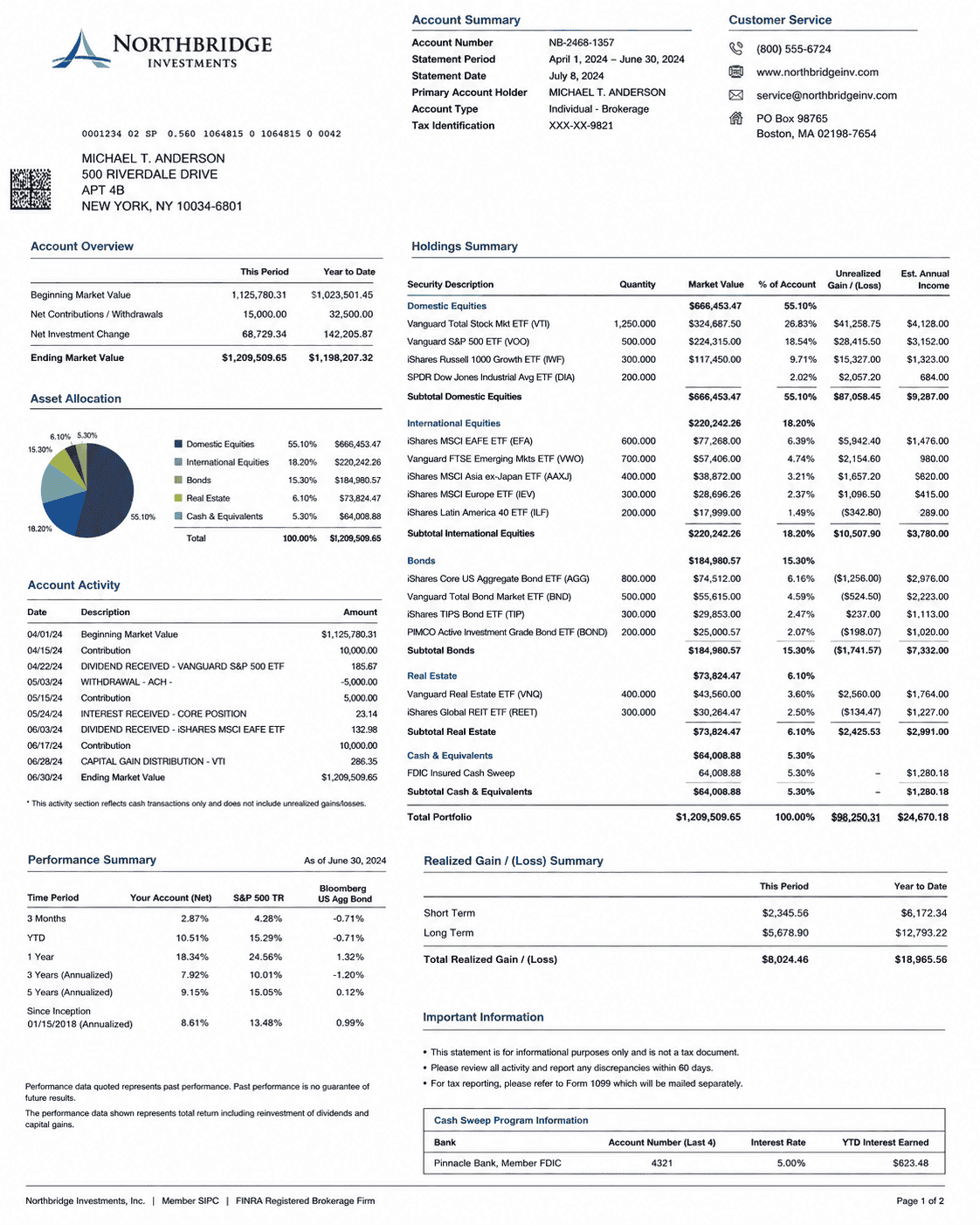
Here's the kind of job Lite is built for. A brokerage statement comes in as an image, and your bookkeeping system needs every account activity row as a typed record with a category.
The plan:
1. **Extract** the account details and every activity row into a schema.
2. **Classify** each row into a fixed set of categories, defined as an enum so no other label can come back.
3. **Gate** each row on the OCR confidence of the line it came from. Rows above 0.9 post automatically, the rest go to a person.
**Interfaze SDK · typescript**
```typescript
import { Interfaze, responseFormat } from "interfaze";
import { z } from "zod";
const interfaze = new Interfaze({ apiKey: process.env.INTERFAZE_API_KEY });
const StatementSchema = z.object({
account_number: z.string(),
account_holder: z.string(),
statement_period: z.string(),
transactions: z.array(
z.object({
date: z.string(),
description: z.string(),
amount: z.number(),
category: z.enum(["contribution", "withdrawal", "dividend", "interest", "capital_gain", "balance"]),
})
),
});
const response = await interfaze.chat.completions.create({
model: "interfaze-1-lite",
messages: [
{
role: "user",
content: [
{ type: "text", text: "Extract the account details and every Account Activity row, and classify each row." },
{
type: "image_url",
image_url: { url: "https://r2public.jigsawstack.com/interfaze/examples/financial_document_example.png" },
},
],
},
],
response_format: responseFormat(z.toJSONSchema(StatementSchema), "bank_statement"),
});
type OcrLine = { text: string; average_confidence: number };
type OcrResult = { sections: { lines: OcrLine[] }[] };
const statement = StatementSchema.parse(JSON.parse(response.choices[0]?.message.content ?? "{}"));
const ocr = response.precontext?.find((p) => p.name === "ocr")?.result as OcrResult | undefined;
const lines = ocr?.sections.flatMap((section) => section.lines) ?? [];
const REVIEW_BELOW = 0.9;
for (const row of statement.transactions) {
const line = lines.find((l) => l.text.startsWith(row.date));
const confidence = line?.average_confidence ?? 0;
const status = confidence >= REVIEW_BELOW ? "auto" : "review";
console.log(status, row.date, row.category, row.amount, confidence);
}
```
**Vercel AI SDK · typescript**
```typescript
import { createInterfaze } from "@interfaze-ai/ai-sdk";
import { generateText, Output } from "ai";
import { z } from "zod";
const interfaze = createInterfaze({ apiKey: process.env.INTERFAZE_API_KEY });
const StatementSchema = z.object({
account_number: z.string(),
account_holder: z.string(),
statement_period: z.string(),
transactions: z.array(
z.object({
date: z.string(),
description: z.string(),
amount: z.number(),
category: z.enum(["contribution", "withdrawal", "dividend", "interest", "capital_gain", "balance"]),
})
),
});
const { output, providerMetadata } = await generateText({
model: interfaze("interfaze-1-lite"),
output: Output.object({ schema: StatementSchema }),
messages: [
{
role: "user",
content: [
{ type: "text", text: "Extract the account details and every Account Activity row, and classify each row." },
{
type: "file",
mediaType: "image/png",
data: new URL("https://r2public.jigsawstack.com/interfaze/examples/financial_document_example.png"),
},
],
},
],
});
type OcrLine = { text: string; average_confidence: number };
type Precontext = { name: string; result: { sections: { lines: OcrLine[] }[] } }[];
const precontext = (providerMetadata?.interfaze?.precontext ?? []) as Precontext;
const lines = precontext.find((p) => p.name === "ocr")?.result.sections.flatMap((section) => section.lines) ?? [];
const REVIEW_BELOW = 0.9;
for (const row of output.transactions) {
const line = lines.find((l) => l.text.startsWith(row.date));
const confidence = line?.average_confidence ?? 0;
const status = confidence >= REVIEW_BELOW ? "auto" : "review";
console.log(status, row.date, row.category, row.amount, confidence);
}
```
**LangChain SDK · typescript**
```typescript
import { ChatInterfaze } from "@interfaze-ai/langchain";
import { AIMessage, HumanMessage } from "@langchain/core/messages";
import { z } from "zod";
const interfaze = new ChatInterfaze({ model: "interfaze-1-lite", apiKey: process.env.INTERFAZE_API_KEY });
const StatementSchema = z.object({
account_number: z.string(),
account_holder: z.string(),
statement_period: z.string(),
transactions: z.array(
z.object({
date: z.string(),
description: z.string(),
amount: z.number(),
category: z.enum(["contribution", "withdrawal", "dividend", "interest", "capital_gain", "balance"]),
})
),
});
const response = await interfaze.withStructuredOutput(StatementSchema, { includeRaw: true }).invoke([
new HumanMessage({
content: [
{ type: "text", text: "Extract the account details and every Account Activity row, and classify each row." },
{
type: "image_url",
image_url: { url: "https://r2public.jigsawstack.com/interfaze/examples/financial_document_example.png" },
},
],
}),
]);
type OcrLine = { text: string; average_confidence: number };
type Precontext = { name: string; result: { sections: { lines: OcrLine[] }[] } }[];
const precontext = ((response.raw as AIMessage).response_metadata.precontext ?? []) as Precontext;
const lines = precontext.find((p) => p.name === "ocr")?.result.sections.flatMap((section) => section.lines) ?? [];
const REVIEW_BELOW = 0.9;
for (const row of response.parsed.transactions) {
const line = lines.find((l) => l.text.startsWith(row.date));
const confidence = line?.average_confidence ?? 0;
const status = confidence >= REVIEW_BELOW ? "auto" : "review";
console.log(status, row.date, row.category, row.amount, confidence);
}
```
**Interfaze SDK · python**
```python
import os
from typing import List, Literal
from pydantic import BaseModel
from interfaze import Interfaze
interfaze = Interfaze(api_key=os.environ["INTERFAZE_API_KEY"])
class Transaction(BaseModel):
date: str
description: str
amount: float
category: Literal["contribution", "withdrawal", "dividend", "interest", "capital_gain", "balance"]
class Statement(BaseModel):
account_number: str
account_holder: str
statement_period: str
transactions: List[Transaction]
response = interfaze.chat.completions.parse(
model="interfaze-1-lite",
messages=[
{
"role": "user",
"content": [
{"type": "text", "text": "Extract the account details and every Account Activity row, and classify each row."},
{
"type": "image_url",
"image_url": {"url": "https://r2public.jigsawstack.com/interfaze/examples/financial_document_example.png"},
},
],
}
],
response_format=Statement,
)
statement = response.choices[0].message.parsed
ocr = next(p["result"] for p in response.precontext if p["name"] == "ocr")
lines = [line for section in ocr["sections"] for line in section["lines"]]
REVIEW_BELOW = 0.9
for row in statement.transactions:
line = next((l for l in lines if l["text"].startswith(row.date)), None)
confidence = line["average_confidence"] if line else 0
status = "auto" if confidence >= REVIEW_BELOW else "review"
print(status, row.date, row.category, row.amount, confidence)
```
**LangChain SDK · python**
```python
import os
from typing import List, Literal
from pydantic import BaseModel
from langchain_core.messages import HumanMessage
from interfaze_langchain import ChatInterfaze
interfaze = ChatInterfaze(model="interfaze-1-lite", api_key=os.environ["INTERFAZE_API_KEY"])
class Transaction(BaseModel):
date: str
description: str
amount: float
category: Literal["contribution", "withdrawal", "dividend", "interest", "capital_gain", "balance"]
class Statement(BaseModel):
account_number: str
account_holder: str
statement_period: str
transactions: List[Transaction]
response = interfaze.with_structured_output(Statement, include_raw=True).invoke([
HumanMessage(content=[
{"type": "text", "text": "Extract the account details and every Account Activity row, and classify each row."},
{
"type": "image_url",
"image_url": {"url": "https://r2public.jigsawstack.com/interfaze/examples/financial_document_example.png"},
},
])
])
statement = response["parsed"]
precontext = response["raw"].response_metadata.get("precontext", [])
ocr = next(p["result"] for p in precontext if p["name"] == "ocr")
lines = [line for section in ocr["sections"] for line in section["lines"]]
REVIEW_BELOW = 0.9
for row in statement.transactions:
line = next((l for l in lines if l["text"].startswith(row.date)), None)
confidence = line["average_confidence"] if line else 0
status = "auto" if confidence >= REVIEW_BELOW else "review"
print(status, row.date, row.category, row.amount, confidence)
```
### The output
The schema response has every row, typed and classified. The withdrawal even keeps its minus sign.
```json
{
"account_number": "NB-2468-1357",
"account_holder": "MICHAEL T. ANDERSON",
"statement_period": "April 1, 2024 - June 30, 2024",
"transactions": [
{ "date": "04/01/24", "description": "Beginning Market Value", "amount": 1125780.31, "category": "balance" },
{ "date": "04/15/24", "description": "Contribution", "amount": 10000, "category": "contribution" },
{ "date": "04/22/24", "description": "DIVIDEND RECEIVED - VANGUARD S&P 500 ETF", "amount": 185.67, "category": "dividend" },
{ "date": "05/03/24", "description": "WITHDRAWAL - ACH -", "amount": -5000, "category": "withdrawal" },
{ "date": "05/15/24", "description": "Contribution", "amount": 5000, "category": "contribution" },
{ "date": "05/24/24", "description": "INTEREST RECEIVED - CORE POSITION", "amount": 23.14, "category": "interest" },
{ "date": "06/03/24", "description": "DIVIDEND RECEIVED - ISHARES MSCI EAFE ETF", "amount": 132.98, "category": "dividend" },
{ "date": "06/17/24", "description": "Contribution", "amount": 10000, "category": "contribution" },
{ "date": "06/28/24", "description": "CAPITAL GAIN DISTRIBUTION - VTI", "amount": 286.35, "category": "capital_gain" },
{ "date": "06/30/24", "description": "Ending Market Value", "amount": 1209509.65, "category": "balance" }
]
}
```
Precontext carries the OCR behind it, with a box and confidence for every line and word. Here it is trimmed to the withdrawal line, without the per-word boxes:
```json
{
"name": "ocr",
"result": {
"extracted_text": "Account Summary\nCustomer Service\n...",
"sections": [
{
"lines": [
{
"text": "05/03/24 WITHDRAWAL - ACH -",
"bounds": {
"top_left": { "x": 31, "y": 774 },
"top_right": { "x": 198, "y": 774 },
"bottom_right": { "x": 198, "y": 786 },
"bottom_left": { "x": 31, "y": 786 }
},
"average_confidence": 0.86,
"words": [
{ "text": "05/03/24", "confidence": 0.99 },
{ "text": "WITHDRAWAL", "confidence": 0.99 },
{ "text": "-", "confidence": 0.92 },
{ "text": "ACH", "confidence": 0.99 },
{ "text": "-", "confidence": 0.42 }
]
}
]
}
]
}
}
```
And the gate prints:
```text
auto 04/01/24 balance 1125780.31 0.99
auto 04/15/24 contribution 10000 0.98
auto 04/22/24 dividend 185.67 0.95
review 05/03/24 withdrawal -5000 0.86
auto 05/15/24 contribution 5000 0.99
auto 05/24/24 interest 23.14 0.92
auto 06/03/24 dividend 132.98 0.95
auto 06/17/24 contribution 10000 0.98
auto 06/28/24 capital_gain 286.35 0.98
auto 06/30/24 balance 1209509.65 0.99
```
Nine rows post on their own. The withdrawal goes to a person, because the trailing dash after "ACH" read at 0.42 and pulled the line down to 0.86.
The extraction was right, and a reviewer confirms it in seconds. That's the point: the model told you exactly which row to look at, and the box tells the reviewer exactly where on the page to look.
A chat model would have returned the same JSON with no way to tell which row was shaky. Here, the category can't fall outside your enum, and every row carries the confidence of the text it came from.
- [Try it in the playground](https://interfaze.ai/dashboard/playground)
- [interfaze-1-lite model card](https://interfaze.ai/docs/models/interfaze-1-lite)
- [Weights on Hugging Face](https://huggingface.co/interfaze-ai/interfaze-1-lite)
- [Compare the models](https://interfaze.ai/docs/models)
- [Precontext docs](https://interfaze.ai/docs/precontext)
- [Get an API key](https://interfaze.ai/dashboard)
## Models for people, models for machines
A chat model's answer is judged by the person reading it. If it's a little off, the reader notices, rephrases, and moves on.
In a pipeline, the reader is an `if` statement. It can't tell a confident answer from a lucky guess, so every mistake flows straight into your database.
That changes what a good output looks like:
| | Built for a person | Built for a program |
| --------------- | ---------------------------- | ------------------------------------------ |
| **Output** | Prose that reads well | Typed fields that match a schema |
| **Labels** | Any word that sounds right | Only values from the set you defined |
| **Location** | "Near the top of page 2" | A bounding box, a page number, a timestamp |
| **Confidence** | Implied by tone | A number on every line, word and field |
| **Consistency** | Nice to vary from run to run | Same input, same output |
| **Mistakes** | Caught by the reader | Caught by a threshold, or not at all |
The confidence score is the one that matters most. A model that is right 95% of the time can't automate a task unless it also tells you which answers are in the other 5%.
With a score, the rule is simple: act on anything above your threshold and send the rest to a person. Without one, a person has to check everything, and nothing is automated.
## Introducing interfaze-1-lite
**interfaze-1-lite** is an open-weight, any-to-text model for deterministic work. It takes text, images, audio and files, including PDFs and Word documents, and returns text or JSON that matches your schema.
It's built for tasks where there's one right answer:
- [OCR](https://interfaze.ai/docs/vision/ocr) with a box and confidence for every line and word
- [Speech-to-text](https://interfaze.ai/docs/audio/speech-to-text) with [speaker diarization](https://interfaze.ai/docs/audio/stt-speaker-diarization)
- Classification and [structured extraction](https://interfaze.ai/docs/structured-output) into your schema
- [Object detection](https://interfaze.ai/docs/vision/object-detection) and [GUI detection](https://interfaze.ai/docs/vision/gui-detection)
- [Translation](https://interfaze.ai/docs/translation), [forecasting](https://interfaze.ai/docs/compute/time-series-forecasting) and [guardrails](https://interfaze.ai/docs/guardrails)
The weights are Apache 2.0 and the whole model runs on a single 80 GB GPU. Through the API it's \$0.85 per million input tokens and \$1.50 per million output tokens.
| | interfaze-1-lite |
| ----------------- | -------------------------- |
| Input price | \$0.85 / MTok |
| Output price | \$1.50 / MTok |
| Context window | 128k tokens |
| Max output tokens | 32k tokens |
| Input | Text, images, audio, files |
| Output | Text, JSON |
| Reasoning | Available |
| PDF pages | Up to 50 per request |
| Open weights | Yes, runs on one 80 GB GPU |
| License | Apache 2.0 |
## The architecture
Lite isn't one network. It's a **reasoning core** plus **specialist models**, each built for one kind of perception.
The core reads the request, decides which specialists to run, and writes the answer from what they return. The specialists do the reading, listening and locating that a general model is weakest at.

### Why split it up
A single vision-language model can read a page well. But it reads the way a person does: it gives you the words, not where they are or how sure it was.
Specialists produce that metadata as part of how they work. A text detector scores every line it finds, and a speech recognizer timestamps every word.
| Approach | Reads the content | Exact positions | Confidence per line | Handles nuance |
| ---------------------------- | ----------------- | --------------- | ------------------- | -------------- |
| General VLM alone | Yes | Approximate | No | Yes |
| Specialist models alone | Yes | Yes | Yes | No |
| **Lite: core + specialists** | **Yes** | **Yes** | **Yes** | **Yes** |
The core keeps what makes an LLM useful: it understands the request, follows your schema and reasons about what it read. The specialists keep what makes classic models useful: precise output with a score attached.
### How the parts combine
**OCR stitches two views of one page.** The document reader supplies the text in reading order, and the line detector supplies the geometry and confidence.
Each detected line takes the reader's words for it. The box is exact, the text is complete, and the confidence comes with it.

These are real lines and scores from the bank statement in the example below.
The other parts combine the same way:
- **Speakers are attributed per word,** by the largest overlap with each speaker's turns, then grouped into chunks.
- **Detection and GUI grounding run on the reasoning core,** which returns boxes on a 0 to 1000 grid. Outlines come from the segmentation model.
- **A [run task](https://interfaze.ai/docs/run-tasks) skips planning.** Naming one capability runs that specialist directly and returns its raw result.
Everything the specialists produce comes back in [precontext](https://interfaze.ai/docs/precontext), next to the answer. Your code gets the clean JSON and the evidence behind it in the same response.
## Benchmarks
Lite is on the [leaderboard](https://interfaze.ai/leaderboards) next to Gemini-3.7-Flash, Claude-Sonnet-5, GPT-5.4-Mini and Grok-4.3. Bold marks where Lite beats all four.
| Benchmark | Task | interfaze-1-lite | interfaze-1 | Best of the other four |
| --------------------------------------------------------------------- | ---------------------- | ---------------- | ----------- | ----------------------- |
| [MMMU-Pro](https://interfaze.ai/leaderboards/mmmu-pro) | Multimodal reasoning | **73.2%** | 71.1% | Grok-4.3, 68.7% |
| [RefCOCO](https://interfaze.ai/leaderboards/refcoco) | Visual grounding | **83.8%** | 82.1% | Gemini-3.7-Flash, 80.9% |
| [SOB value accuracy](https://interfaze.ai/leaderboards/structured-output-benchmark) | Structured output | **81.5%** | 80.5% | Gemini-3.7-Flash, 80.2% |
| [olmOCR](https://interfaze.ai/leaderboards/olmocr) | Document OCR | **83.8%** | 85.7% | Claude-Sonnet-5, 83.5% |
| [VoxPopuli WER](https://interfaze.ai/leaderboards/voxpopuli-cleaned-aa) (lower is better) | Speech recognition | **3.0%** | 2.4% | Gemini-3.7-Flash, 4.0% |
| [Spider 2.0-Lite](https://interfaze.ai/leaderboards/spider-2-lite) | Text-to-SQL | 48.9% | 52.9% | Claude-Sonnet-5, 50.6% |
| [GPQA Diamond](https://interfaze.ai/leaderboards/gpqa-diamond) | PhD-level science | 85.9% | 92.4% | Gemini-3.7-Flash, 91.4% |
| [OCRBench V2](https://interfaze.ai/leaderboards/ocrbench-v2) | Text in images | 60.9% | 70.7% | Gemini-3.7-Flash, 63.9% |
| [MMMLU](https://interfaze.ai/leaderboards/mmmlu) | Multilingual knowledge | 87.8% | 90.9% | Grok-4.3, 89.7% |
Lite leads on multimodal reasoning, visual grounding, structured output, document OCR and speech. It even edges out our flagship on MMMU-Pro, RefCOCO and SOB.
It trails on text in images, general knowledge and science questions. For those, [interfaze-1](https://interfaze.ai/docs/models/interfaze-1) scores higher.
[View the full benchmark breakdown →](https://interfaze.ai/leaderboards)
## Self-hosting
The weights are on [Hugging Face](https://huggingface.co/interfaze-ai/interfaze-1-lite) under the [Apache 2.0 license](https://www.apache.org/licenses/LICENSE-2.0). The whole model runs on a single 80 GB GPU with no external services, so it works offline.
You need a GPU with compute capability 8.9 or newer, like an H100, and `ffmpeg` for audio.
```bash
hf download interfaze-ai/interfaze-1-lite requirements.txt --local-dir .
pip install -r requirements.txt
```
Load it with Transformers and call `chat`, the same entry point the API uses. The core plans, runs the specialists it needs and answers.
```python
from transformers import AutoModel
model = AutoModel.from_pretrained("interfaze-ai/interfaze-1-lite", trust_remote_code=True)
answer = model.chat(
[{"role": "user", "content": "What is the total, and which item is highlighted?"}],
files=["receipt.jpg"],
)
print(answer["content"])
```
To skip planning, call one capability directly. `ocr` runs the document reader and line geometry and returns the stitched page.
```python
doc = model.ocr("invoice.pdf", page_range=[1, 2])
print(doc["text"])
```
The [model card](https://huggingface.co/interfaze-ai/interfaze-1-lite) covers every capability's method, arguments and output.
Transformers is slower than a batching serving engine. For throughput, use the API.
## Use it with the Interfaze API
To try it without code, open the [playground](https://interfaze.ai/dashboard/playground) and pick `interfaze-1-lite` from the model picker. It shows the answer and the precontext behind it.
In code, set `model` to `interfaze-1-lite`. Everything else works the same as [interfaze-1](https://interfaze.ai/docs/models/interfaze-1), including structured output and precontext.
**Interfaze SDK · typescript**
```typescript
import { Interfaze } from "interfaze";
const interfaze = new Interfaze({ apiKey: process.env.INTERFAZE_API_KEY });
const response = await interfaze.chat.completions.create({
model: "interfaze-1-lite",
messages: [
{
role: "user",
content: [
{ type: "text", text: "Extract the details from this ID" },
{ type: "image_url", image_url: { url: "https://r2public.jigsawstack.com/interfaze/examples/id.jpg" } },
],
},
],
});
console.log(response.choices[0]?.message.content);
```
**Vercel AI SDK · typescript**
```typescript
import { createInterfaze } from "@interfaze-ai/ai-sdk";
import { generateText } from "ai";
const interfaze = createInterfaze({ apiKey: process.env.INTERFAZE_API_KEY });
const { text } = await generateText({
model: interfaze("interfaze-1-lite"),
messages: [
{
role: "user",
content: [
{ type: "text", text: "Extract the details from this ID" },
{ type: "file", mediaType: "image/jpeg", data: new URL("https://r2public.jigsawstack.com/interfaze/examples/id.jpg") },
],
},
],
});
console.log(text);
```
**LangChain SDK · typescript**
```typescript
import { ChatInterfaze } from "@interfaze-ai/langchain";
import { HumanMessage } from "@langchain/core/messages";
const interfaze = new ChatInterfaze({ model: "interfaze-1-lite", apiKey: process.env.INTERFAZE_API_KEY });
const response = await interfaze.invoke([
new HumanMessage({
content: [
{ type: "text", text: "Extract the details from this ID" },
{ type: "image_url", image_url: { url: "https://r2public.jigsawstack.com/interfaze/examples/id.jpg" } },
],
}),
]);
console.log(response.content);
```
**Interfaze SDK · python**
```python
import os
from interfaze import Interfaze
interfaze = Interfaze(api_key=os.environ["INTERFAZE_API_KEY"])
response = interfaze.chat.completions.create(
model="interfaze-1-lite",
messages=[
{
"role": "user",
"content": [
{"type": "text", "text": "Extract the details from this ID"},
{"type": "image_url", "image_url": {"url": "https://r2public.jigsawstack.com/interfaze/examples/id.jpg"}},
],
}
],
)
print(response.choices[0].message.content)
```
**LangChain SDK · python**
```python
import os
from interfaze_langchain import ChatInterfaze
from langchain_core.messages import HumanMessage
interfaze = ChatInterfaze(model="interfaze-1-lite", api_key=os.environ["INTERFAZE_API_KEY"])
response = interfaze.invoke([
HumanMessage(content=[
{"type": "text", "text": "Extract the details from this ID"},
{"type": "image_url", "image_url": {"url": "https://r2public.jigsawstack.com/interfaze/examples/id.jpg"}},
])
])
print(response.content)
```
Interfaze speaks the Chat Completions standard, so any OpenAI-compatible SDK works too. Point it at `https://api.interfaze.ai/v1` with your key from the [dashboard](https://interfaze.ai/dashboard).
## Example: read a bank statement, classify every row
Here's the kind of job Lite is built for. A brokerage statement comes in as an image, and your bookkeeping system needs every account activity row as a typed record with a category.

The plan:
1. **Extract** the account details and every activity row into a schema.
2. **Classify** each row into a fixed set of categories, defined as an enum so no other label can come back.
3. **Gate** each row on the OCR confidence of the line it came from. Rows above 0.9 post automatically, the rest go to a person.
**Interfaze SDK · typescript**
```typescript
import { Interfaze, responseFormat } from "interfaze";
import { z } from "zod";
const interfaze = new Interfaze({ apiKey: process.env.INTERFAZE_API_KEY });
const StatementSchema = z.object({
account_number: z.string(),
account_holder: z.string(),
statement_period: z.string(),
transactions: z.array(
z.object({
date: z.string(),
description: z.string(),
amount: z.number(),
category: z.enum(["contribution", "withdrawal", "dividend", "interest", "capital_gain", "balance"]),
})
),
});
const response = await interfaze.chat.completions.create({
model: "interfaze-1-lite",
messages: [
{
role: "user",
content: [
{ type: "text", text: "Extract the account details and every Account Activity row, and classify each row." },
{
type: "image_url",
image_url: { url: "https://r2public.jigsawstack.com/interfaze/examples/financial_document_example.png" },
},
],
},
],
response_format: responseFormat(z.toJSONSchema(StatementSchema), "bank_statement"),
});
type OcrLine = { text: string; average_confidence: number };
type OcrResult = { sections: { lines: OcrLine[] }[] };
const statement = StatementSchema.parse(JSON.parse(response.choices[0]?.message.content ?? "{}"));
const ocr = response.precontext?.find((p) => p.name === "ocr")?.result as OcrResult | undefined;
const lines = ocr?.sections.flatMap((section) => section.lines) ?? [];
const REVIEW_BELOW = 0.9;
for (const row of statement.transactions) {
const line = lines.find((l) => l.text.startsWith(row.date));
const confidence = line?.average_confidence ?? 0;
const status = confidence >= REVIEW_BELOW ? "auto" : "review";
console.log(status, row.date, row.category, row.amount, confidence);
}
```
**Vercel AI SDK · typescript**
```typescript
import { createInterfaze } from "@interfaze-ai/ai-sdk";
import { generateText, Output } from "ai";
import { z } from "zod";
const interfaze = createInterfaze({ apiKey: process.env.INTERFAZE_API_KEY });
const StatementSchema = z.object({
account_number: z.string(),
account_holder: z.string(),
statement_period: z.string(),
transactions: z.array(
z.object({
date: z.string(),
description: z.string(),
amount: z.number(),
category: z.enum(["contribution", "withdrawal", "dividend", "interest", "capital_gain", "balance"]),
})
),
});
const { output, providerMetadata } = await generateText({
model: interfaze("interfaze-1-lite"),
output: Output.object({ schema: StatementSchema }),
messages: [
{
role: "user",
content: [
{ type: "text", text: "Extract the account details and every Account Activity row, and classify each row." },
{
type: "file",
mediaType: "image/png",
data: new URL("https://r2public.jigsawstack.com/interfaze/examples/financial_document_example.png"),
},
],
},
],
});
type OcrLine = { text: string; average_confidence: number };
type Precontext = { name: string; result: { sections: { lines: OcrLine[] }[] } }[];
const precontext = (providerMetadata?.interfaze?.precontext ?? []) as Precontext;
const lines = precontext.find((p) => p.name === "ocr")?.result.sections.flatMap((section) => section.lines) ?? [];
const REVIEW_BELOW = 0.9;
for (const row of output.transactions) {
const line = lines.find((l) => l.text.startsWith(row.date));
const confidence = line?.average_confidence ?? 0;
const status = confidence >= REVIEW_BELOW ? "auto" : "review";
console.log(status, row.date, row.category, row.amount, confidence);
}
```
**LangChain SDK · typescript**
```typescript
import { ChatInterfaze } from "@interfaze-ai/langchain";
import { AIMessage, HumanMessage } from "@langchain/core/messages";
import { z } from "zod";
const interfaze = new ChatInterfaze({ model: "interfaze-1-lite", apiKey: process.env.INTERFAZE_API_KEY });
const StatementSchema = z.object({
account_number: z.string(),
account_holder: z.string(),
statement_period: z.string(),
transactions: z.array(
z.object({
date: z.string(),
description: z.string(),
amount: z.number(),
category: z.enum(["contribution", "withdrawal", "dividend", "interest", "capital_gain", "balance"]),
})
),
});
const response = await interfaze.withStructuredOutput(StatementSchema, { includeRaw: true }).invoke([
new HumanMessage({
content: [
{ type: "text", text: "Extract the account details and every Account Activity row, and classify each row." },
{
type: "image_url",
image_url: { url: "https://r2public.jigsawstack.com/interfaze/examples/financial_document_example.png" },
},
],
}),
]);
type OcrLine = { text: string; average_confidence: number };
type Precontext = { name: string; result: { sections: { lines: OcrLine[] }[] } }[];
const precontext = ((response.raw as AIMessage).response_metadata.precontext ?? []) as Precontext;
const lines = precontext.find((p) => p.name === "ocr")?.result.sections.flatMap((section) => section.lines) ?? [];
const REVIEW_BELOW = 0.9;
for (const row of response.parsed.transactions) {
const line = lines.find((l) => l.text.startsWith(row.date));
const confidence = line?.average_confidence ?? 0;
const status = confidence >= REVIEW_BELOW ? "auto" : "review";
console.log(status, row.date, row.category, row.amount, confidence);
}
```
**Interfaze SDK · python**
```python
import os
from typing import List, Literal
from pydantic import BaseModel
from interfaze import Interfaze
interfaze = Interfaze(api_key=os.environ["INTERFAZE_API_KEY"])
class Transaction(BaseModel):
date: str
description: str
amount: float
category: Literal["contribution", "withdrawal", "dividend", "interest", "capital_gain", "balance"]
class Statement(BaseModel):
account_number: str
account_holder: str
statement_period: str
transactions: List[Transaction]
response = interfaze.chat.completions.parse(
model="interfaze-1-lite",
messages=[
{
"role": "user",
"content": [
{"type": "text", "text": "Extract the account details and every Account Activity row, and classify each row."},
{
"type": "image_url",
"image_url": {"url": "https://r2public.jigsawstack.com/interfaze/examples/financial_document_example.png"},
},
],
}
],
response_format=Statement,
)
statement = response.choices[0].message.parsed
ocr = next(p["result"] for p in response.precontext if p["name"] == "ocr")
lines = [line for section in ocr["sections"] for line in section["lines"]]
REVIEW_BELOW = 0.9
for row in statement.transactions:
line = next((l for l in lines if l["text"].startswith(row.date)), None)
confidence = line["average_confidence"] if line else 0
status = "auto" if confidence >= REVIEW_BELOW else "review"
print(status, row.date, row.category, row.amount, confidence)
```
**LangChain SDK · python**
```python
import os
from typing import List, Literal
from pydantic import BaseModel
from langchain_core.messages import HumanMessage
from interfaze_langchain import ChatInterfaze
interfaze = ChatInterfaze(model="interfaze-1-lite", api_key=os.environ["INTERFAZE_API_KEY"])
class Transaction(BaseModel):
date: str
description: str
amount: float
category: Literal["contribution", "withdrawal", "dividend", "interest", "capital_gain", "balance"]
class Statement(BaseModel):
account_number: str
account_holder: str
statement_period: str
transactions: List[Transaction]
response = interfaze.with_structured_output(Statement, include_raw=True).invoke([
HumanMessage(content=[
{"type": "text", "text": "Extract the account details and every Account Activity row, and classify each row."},
{
"type": "image_url",
"image_url": {"url": "https://r2public.jigsawstack.com/interfaze/examples/financial_document_example.png"},
},
])
])
statement = response["parsed"]
precontext = response["raw"].response_metadata.get("precontext", [])
ocr = next(p["result"] for p in precontext if p["name"] == "ocr")
lines = [line for section in ocr["sections"] for line in section["lines"]]
REVIEW_BELOW = 0.9
for row in statement.transactions:
line = next((l for l in lines if l["text"].startswith(row.date)), None)
confidence = line["average_confidence"] if line else 0
status = "auto" if confidence >= REVIEW_BELOW else "review"
print(status, row.date, row.category, row.amount, confidence)
```
### The output
The schema response has every row, typed and classified. The withdrawal even keeps its minus sign.
```json
{
"account_number": "NB-2468-1357",
"account_holder": "MICHAEL T. ANDERSON",
"statement_period": "April 1, 2024 - June 30, 2024",
"transactions": [
{ "date": "04/01/24", "description": "Beginning Market Value", "amount": 1125780.31, "category": "balance" },
{ "date": "04/15/24", "description": "Contribution", "amount": 10000, "category": "contribution" },
{ "date": "04/22/24", "description": "DIVIDEND RECEIVED - VANGUARD S&P 500 ETF", "amount": 185.67, "category": "dividend" },
{ "date": "05/03/24", "description": "WITHDRAWAL - ACH -", "amount": -5000, "category": "withdrawal" },
{ "date": "05/15/24", "description": "Contribution", "amount": 5000, "category": "contribution" },
{ "date": "05/24/24", "description": "INTEREST RECEIVED - CORE POSITION", "amount": 23.14, "category": "interest" },
{ "date": "06/03/24", "description": "DIVIDEND RECEIVED - ISHARES MSCI EAFE ETF", "amount": 132.98, "category": "dividend" },
{ "date": "06/17/24", "description": "Contribution", "amount": 10000, "category": "contribution" },
{ "date": "06/28/24", "description": "CAPITAL GAIN DISTRIBUTION - VTI", "amount": 286.35, "category": "capital_gain" },
{ "date": "06/30/24", "description": "Ending Market Value", "amount": 1209509.65, "category": "balance" }
]
}
```
Precontext carries the OCR behind it, with a box and confidence for every line and word. Here it is trimmed to the withdrawal line, without the per-word boxes:
```json
{
"name": "ocr",
"result": {
"extracted_text": "Account Summary\nCustomer Service\n...",
"sections": [
{
"lines": [
{
"text": "05/03/24 WITHDRAWAL - ACH -",
"bounds": {
"top_left": { "x": 31, "y": 774 },
"top_right": { "x": 198, "y": 774 },
"bottom_right": { "x": 198, "y": 786 },
"bottom_left": { "x": 31, "y": 786 }
},
"average_confidence": 0.86,
"words": [
{ "text": "05/03/24", "confidence": 0.99 },
{ "text": "WITHDRAWAL", "confidence": 0.99 },
{ "text": "-", "confidence": 0.92 },
{ "text": "ACH", "confidence": 0.99 },
{ "text": "-", "confidence": 0.42 }
]
}
]
}
]
}
}
```
And the gate prints:
```text
auto 04/01/24 balance 1125780.31 0.99
auto 04/15/24 contribution 10000 0.98
auto 04/22/24 dividend 185.67 0.95
review 05/03/24 withdrawal -5000 0.86
auto 05/15/24 contribution 5000 0.99
auto 05/24/24 interest 23.14 0.92
auto 06/03/24 dividend 132.98 0.95
auto 06/17/24 contribution 10000 0.98
auto 06/28/24 capital_gain 286.35 0.98
auto 06/30/24 balance 1209509.65 0.99
```
Nine rows post on their own. The withdrawal goes to a person, because the trailing dash after "ACH" read at 0.42 and pulled the line down to 0.86.
The extraction was right, and a reviewer confirms it in seconds. That's the point: the model told you exactly which row to look at, and the box tells the reviewer exactly where on the page to look.
A chat model would have returned the same JSON with no way to tell which row was shaky. Here, the category can't fall outside your enum, and every row carries the confidence of the text it came from.
- [Try it in the playground](https://interfaze.ai/dashboard/playground)
- [interfaze-1-lite model card](https://interfaze.ai/docs/models/interfaze-1-lite)
- [Weights on Hugging Face](https://huggingface.co/interfaze-ai/interfaze-1-lite)
- [Compare the models](https://interfaze.ai/docs/models)
- [Precontext docs](https://interfaze.ai/docs/precontext)
- [Get an API key](https://interfaze.ai/dashboard)